
Profile and devices
Signing in with a Google or Apple account is optional. You only need it when you want to carry on with the same Profile on another device, or don't want to lose it when you change phones. To make the rest clear, first the three words the game keeps using, and what exactly each of them means.
Three words
Your Profile is you in the game: what the game remembers about you and what other players see. That is your nickname and picture, your coins, your League Points, your place on the leaderboard, your "Multiplayer" statistics and your list of blocked players. The Profile is kept on the SlovoBoj server. Each Profile has its own coins and points, and two Profiles can't be merged into one. A Profile opens on the device where it was made and, once you link it with a Google or Apple account, on every device where you sign in with that account.
A device is what you play on: a phone, a tablet or a browser on a computer. Each browser is a separate device, so Chrome and Edge on the same computer are two devices. The first time you choose "Play without signing in" on a device and enter a nickname, the game makes a new Profile. We call it the Device Profile: it opens only on the device where it was made, but it needs no signing in and no account. Your records, stars and "Single player" statistics also stay on the device, whichever Profile you play with.
Your account is your Google account (the one you use for Gmail or Google Play) or your Apple account (the one you use for the App Store or iCloud). It isn't part of SlovoBoj and nothing from the game is kept in it: SlovoBoj only uses it as a key, for Google or Apple to confirm that it's really you. The game never sees your password, and the server keeps neither the account's e-mail address nor its name.
When you link your Device Profile with an account, you can open the same Profile on another device too: you sign in there with that account and carry on with the same nickname, coins and points. So the account is what moves your Profile from device to device. In a browser (slovoboj.com/play) and in the iPhone app you can choose Google or Apple, in the Android app Google only. A Profile may have both accounts (see "Google and Apple on the same Profile").
The idea, the problem and the solution
Think of your Profile as a box with your game data in it. The box is kept on the SlovoBoj server, and it was made by the device on which the game was first started. The game didn't ask you to sign in or to open an account, so you could start playing straight away. That's why, at first, only that device has the key to the box.
The problem
Say you'd like to play at work too, in a browser on the computer (during your break, of course). The browser is a new device and doesn't have the key to the box from your phone. So you can't carry on with your game there: you play with a new Device Profile, from zero.
The solution
On the device where you already play and have your progress, link the Profile with your Google or Apple account (1). The key to the box then goes to your account as well.
Then, on the other device (in our example, the computer at work), sign in with the same account (2). The game opens your Profile there, and you carry on with the same nickname, coins and points.
When you're done, you can sign out on that device (3), so your colleagues don't play with your Profile.
Forgot to sign out? No harm done: every device where you play with that Profile shows the list of all the devices signed in to it, and you can sign out any of them from there (4).
Where to find these options
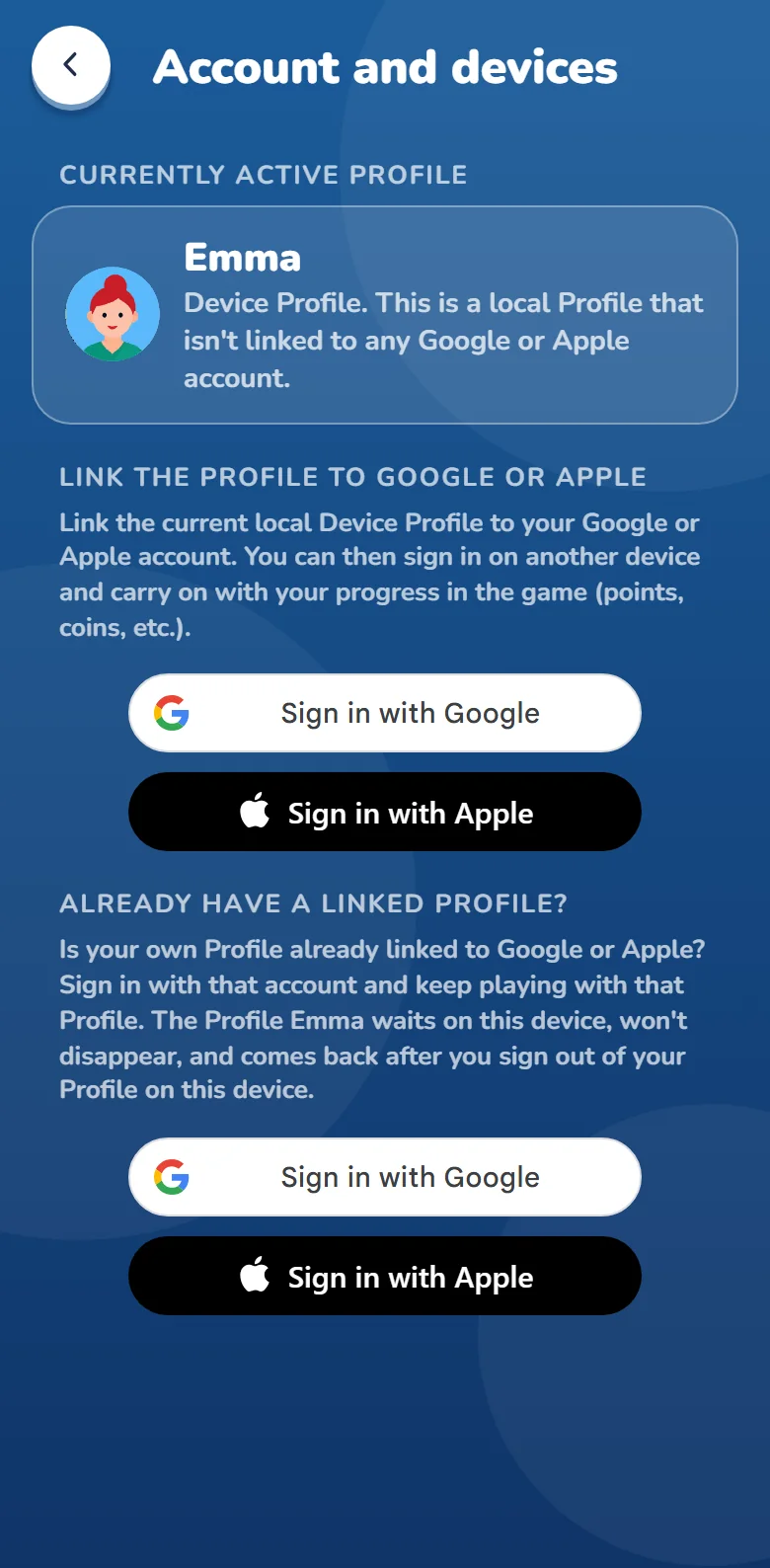
Everything is in "Settings → Profile → Account and devices". The captions name the accounts that device offers: on Android "Google", on an iPhone "Apple or Google", in a browser "Google or Apple".
- Linking, on the device where you have your progress: under "Link the Profile to Google" (on an iPhone "…to Apple or Google", in a browser "…to Google or Apple") touch "Sign in with Google" or "Sign in with Apple" and choose an account.
- Signing in, on the other device: if you already play there without signing in, under "Already have a linked Profile?"; if there is no Profile there yet, under "Play with an account" (it is on the nickname screen too). Touch the button of the same account ("Sign in with Google" or "Sign in with Apple") and choose that account.
- Signing out, on the other device: "Sign out of this device". Careful, not "Unlink": unlinking takes the key away from the Profile and signs out every other device, your phone included.
- The list of devices, on any device with that Profile: under "Devices using this Profile" touch "Sign out" next to a device, or "Sign out other devices" for every device except this one.
To see whether your Profile is linked, open "Settings → Profile → Account and devices": the row says "Device Profile" (not linked) or "Google" or "Apple" (linked), and on the "Account and devices" screen, under "Currently active Profile", the line under your nickname says "Device Profile. This is a local Profile that isn't linked to any Google account." (on an iPhone and in a browser with both accounts) or "Linked account: Google" (or Apple), and with both accounts "Linked accounts: Google and Apple".
An example: Ana plays on a tablet without signing in and has 350 coins.
- If Ana links the Profile with a Google account under "Link the Profile to Google", it is still Ana with 350 coins, but Ana can now open the same Profile on a phone too and carry on playing there.
- If Marko signs in on that tablet under "Already have a linked Profile?" with Marko's own Google account, Marko plays on the tablet, with Marko's own coins. Ana's Profile stays on the tablet and comes back as soon as Marko signs out.
In a browser, Google draws the "Sign in with Google" button itself, so it may also say "Sign in as" and a name. "Sign in with Apple" opens Apple's sign-in window.
The other buttons in "Account and devices"
- Devices using this Profile: the devices signed in to the Profile ("Android", "iPhone or iPad", "Browser") with the date each was last used; the one you are looking at the list on says "This device". Only a linked Profile has this list.
- Sign out, next to another device: that device is signed out, even when it isn't with you. Signing in with the same account brings the Profile back on it.
- Sign out other devices: the same for every device except this one.
- Sign out of this device: this device closes the Profile and forgets it. The Profile stays with the account and comes back when you sign in, so nothing is lost. The game goes back to the menu, with the Device Profile if there is one; the text under the button says which Profile you will play with next, or that there will be no Profile.
- Unlink, next to Google or Apple under "Linked accounts": the Profile loses its key and becomes a Device Profile again, on this device only. Every other device is signed out.
The game asks you to confirm before every sign-out and unlink.
Step by step
First time: with or without signing in
The nickname screen opens the first time you touch "Single player" or "Multiplayer" (in the app also the coin button). Signing in ("Play with an account") is at the top, "Play without signing in" below it.
Signing in (you don't lose the Profile when you change phones):
- Under "Play with an account" touch "Sign in with Google" (on an iPhone and in a browser also "Sign in with Apple") and choose your account.
- The first time, Google asks whether it may give SlovoBoj your account's name, e-mail address and picture. Confirm. SlovoBoj keeps none of these on the server; it shows the e-mail address only on your device, so you know which account is signed in. Apple asks none of this, because SlovoBoj asks Apple for neither the name nor the e-mail.
- If that account already has a Profile, you play with it straight away. If not, the screen says "New profile for" and your e-mail address (with Apple, "Apple account"): enter a nickname, pick a picture, touch "Save" and accept the terms of use ("I accept").
Without signing in:
- Under "Play without signing in" enter a nickname, pick a picture and touch "Save".
- Accept the terms of use. This is now a Device Profile, on this device only, and you can link it whenever you like.
Linking the Profile you already have
- Open "Settings → Profile → Account and devices". The row says "Device Profile".
- Under "Link the Profile to Google" (on an iPhone and in a browser with both accounts) touch "Sign in with Google" or "Sign in with Apple" and choose an account.
- The game says "Profile linked. Sign in with this account anywhere." and Google or Apple shows "Linked". Your nickname, picture, coins and points are the same as before.
From then on it is the Profile this device is signed in to, no longer a Device Profile: if you sign out on this device, the device forgets it, and signing in brings it back.
If "This account already has a profile" appears, that account already opens another Profile (from an old phone, say). Profiles don't merge. "Sign in" opens that other Profile, and the Device Profile stays on the device and waits. "Cancel" changes nothing; if it's the Device Profile you want to link, repeat the steps with another account.
A new phone or tablet
If the Profile is linked:
- Install SlovoBoj on the new device and touch "Single player".
- Under "Play with an account" sign in with the same account. A Profile linked with Apple only opens on an iPhone and in a browser, not in the Android app (see "Google and Apple on the same Profile").
- Your nickname, picture, coins and League Points are there. In single player you carry on from the level the server remembered (it remembers levels solved online). Records, stars and "Single player" statistics stay on the old device.
- The old device is still signed in. If you give it to someone, touch "Sign out of this device" on it, or sign it out from the new one: in "Account and devices", under "Devices using this Profile", touch "Sign out" next to the old device.
If the Profile isn't linked and the old phone still works: link it on the old phone first (see "Linking the Profile you already have"), then start from step 1.
If the Profile isn't linked and the old phone is gone, the Profile unfortunately can't be brought back. Make a new Profile on the new phone and link it straight away.
The game installed again
- On an iPhone the Device Profile stays even after you delete the game: the iPhone keeps it in its password store, so the reinstalled game finds it. A linked Profile is forgotten when the game is installed again; signing in with the same account brings it back.
- On Android and in a browser don't count on it: before you delete the game, clear the browser's data or reset the phone to factory settings, link your Profile with an account.
The same Profile in a browser on a computer
- If the Profile isn't linked yet, link it on your phone.
- On the computer open slovoboj.com/play and choose "Single player".
- Under "Play with an account" sign in with the same account.
If you already play without signing in in that browser, instead of steps 2 and 3 open "Settings → Profile → Account and devices" and sign in under "Already have a linked Profile?". The phone and the browser now open the same Profile, and both are on the list of devices.
A lost or stolen phone
- On another device (another phone, or a browser at slovoboj.com/play) sign in with the same account.
- Open "Settings → Profile → Account and devices". Under "Devices using this Profile" find the lost phone ("Android" or "iPhone or iPad", with the date it was last used), touch "Sign out" and confirm. Not sure which one it is? "Sign out other devices" signs out every device except the one you are on.
- As soon as the lost phone goes online, it says "This device was signed out", and the Profile no longer opens there without signing in.
If your Google or Apple account is still on that phone too, remove the phone from that account as well (Google: in your Google account's settings, "Security", then "Your devices"; Apple: at account.apple.com, "Devices"); otherwise someone could sign in with that account on it again.
A Device Profile on a lost phone can be neither signed out nor brought back.
One tablet or computer for the whole family
Everybody has their own Profile and their own coins. Let the person who uses the device most have the Device Profile, and the others sign in with their own accounts:
- Open "Settings → Profile → Account and devices" and under "Already have a linked Profile?" touch the button of your account ("Sign in with Google" or "Sign in with Apple"). Choose your account. If the account has no Profile yet, enter a nickname and pick a picture.
- The game goes back to the menu, now with your Profile. Play.
- When you're done, open "Settings → Profile → Account and devices", touch "Sign out of this device" and confirm. The device goes back to the Device Profile.
The single-player level, records and statistics are kept per device, not per Profile, so on a shared tablet everybody carries on from the same level. Nicknames, coins and League Points are kept per Profile, so everybody has their own. Players under 16 don't sign in (see Age restrictions).
On Android, Google offers only the accounts added to that device (in the device's settings, "Accounts"). Anyone who doesn't want to add their Google account to a shared tablet can play in a browser at slovoboj.com/play and sign out of Google there at the end.
Someone else's or a public computer
- On the nickname screen sign in under "Play with an account", not under "Play without signing in": a Device Profile would stay on that computer.
- When you're done, open "Settings → Profile → Account and devices" and touch "Sign out of this device".
- Sign out of Google or Apple in the browser too: signing out of SlovoBoj doesn't sign you out of them.
The same goes for a private (incognito) browser window: once you close it, the browser forgets everything, so a Device Profile would be gone too.
The same Profile on two devices at once
You can play single player on as many devices as you like. In a room the Profile is on one device only, so on the other one the game says "Profile in a room on another device. Close the game there." To carry on on this device, close the game on the other one (don't leave the room during a match, because that means giving up), then open "Multiplayer" again on this one: this device takes over the seat in the room and the match goes on with the same points.
Google and Apple on the same Profile
A Profile may be linked with both a Google and an Apple account, and then opens with either. That's how a Profile linked with Apple only gets Google too, so you can open it in the Android app:
- On an iPhone or in a browser at slovoboj.com/play sign in with your Apple account (skip this if you already play with that Profile there).
- Open "Settings → Profile → Account and devices". Under "Linked accounts" touch "Sign in with Google" and choose your Google account.
- Both accounts show "Linked". Now sign in with your Google account in the Android app.
That's why the Android app says under its sign-in button "Profile linked only to Apple? Add Google to it at slovoboj.com/play."
Another Google account for the same Profile
- On a device where you play with that Profile, open "Settings → Profile → Account and devices".
- Touch "Unlink" next to Google and confirm. It is now a Device Profile, on this device only, and the other devices are signed out.
- Under "Link the Profile to Google" touch "Sign in with Google" and choose the new account.
- On your other devices sign in with the new account.
If the game says "Can't unlink here": a device can have only one Device Profile, and a Profile whose last account you unlink becomes exactly that. Do it on a device where the Profile opens only by signing in, such as a new phone or a browser where the game has never been played without signing in.
You no longer want to sign in
- Open "Settings → Profile → Account and devices", touch "Unlink" next to Google or Apple and confirm (if both are linked, unlink both).
- The Profile stays on this device only, as a Device Profile, with the same nickname and coins, and the row says "Device Profile". Every other device is signed out.
If you like, also remove SlovoBoj from your Google account (in your Google account's settings: "Security", then "Third-party apps and services"). We remove SlovoBoj from your Apple account ourselves when you unlink Apple. To delete the Profile completely, see Deleting your profile.
You have two Profiles and want one
Profiles don't merge, and coins and points can't be moved from one to the other. Decide which one you keep. You can delete the other: while you play with it, "Settings → Profile → Delete profile".
Messages about your Profile
- "This device was signed out": the Profile was signed out of this device, usually from another device ("Sign out", "Sign out other devices") or by unlinking the account; a device that isn't used for a year is signed out by itself as well. The Profile isn't lost: touch the button of the same account ("Sign in with Google" or "Sign in with Apple") and choose that account. "Continue" (or "Continue as" and the nickname of the Device Profile) goes on without it.
- "Profile deleted": the Profile was deleted, on this device or another one, or because it wasn't used for a long time (see Deleting your profile). It can't be brought back. Single-player progress and records stay on the device, and you can make a new Profile on the nickname screen.
- "This account already has a profile": see "Linking the Profile you already have".
- "Can't unlink here": see "Another Google account for the same Profile".
- "No Google account on this device. Add one in its settings.": open "Accounts" in the device's settings and add a Google account, or play in a browser at slovoboj.com/play.